In previous versions of Excel when you had a drop-down list that contained duplicates those duplicates would show up in the drop-down list. This has been fixed in the latest versions of Excel. The duplicates are now removed.
Category Archives: Data
Excel PivotTable Subtotal Label Trick
I just learned a new trick for labelling subtotal rows in a PivotTable. Hat tip to Ken Puls MVP of Excel Guru for this tip.
Useful Excel Keyboard Shortcuts for Data Entry
When making entries in Excel there are a few keyboard shortcuts worth knowing. These can save you time and effort.
More Adjusting in Excel
Following on from last week’s post on a single adjustment formula this post will share a more robust solution for including or excluding adjustments.
Adjusting in Excel
One of the advantages with Excel is that you can usually handle exceptions. In this post I examine a way to handle exceptions or adjustments without using the IF function.
SUMIFS Wildcard Limitation
SUMIFS can use wildcard characters, but the wildcards only work on text-based codes.
Excel Custom Function for a List
Excel’s Custom Lists are great, but you need to drag them to create them. If you have a list that you use frequently why not create a custom function to display it? This has the added advantage of creating a spill range that can then drive other dynamic array formulas.
Excel Has Ordinals
Woohoo, I don’t know when this happened, but you can now get Excel to extend your ordinals when you drag with the Fill Handle and use things like 1st, 2nd, 3rd and 4th etc.
Type 1st January in a cell and drag the cell down.
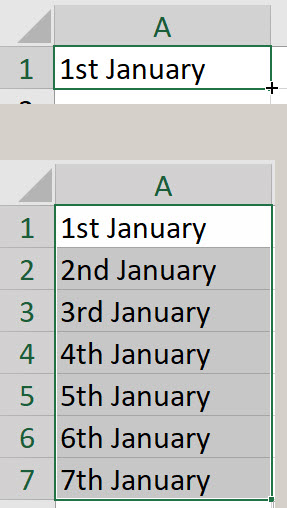
It seems to work with ordinals at the start rather than at the end of a text string. So January 1st doesn’t work. 1st by itself does work.
FILTER Function Technique
An application I use recently updated it’s filtering options to allow you to filter by any filters or all filters. This was a useful addition to the software and I thought that I could apply the same idea to Excel’s FILTER function.
Benford’s Law in Excel – Part One
Benford’s law is used in auditing to identify data sets that may have been manipulated or adjusted. In actual data sets when reviewing values the 1st digit of the values tends to follow a predetermined frequency. For example, roughly 30% of the values should start with a 1.
Comparing Averages in Excel
It is common in Excel to use averages to summarise large data sets. It is also common to compare the averages across different segments. Here’s a technique you might find useful when comparing a segment against all other segments.
Extract Text Before a Number in Excel
Excel’s new TEXTBEFORE function simplifies extracting text from the left. In this example I share how to extract all the text before a number in a code.
Excel Dashboards #1 Guidelines & Techniques
In this recording of a live webinar I ran in March 2023 you will learn about guidelines and technique for building dashboards in Excel.
Use the button below the video to download the materials.
This is the first session is a series of five webinars on Excel dashboards. The other four sessions are paid sessions.
In this free session we will focus on chart and dashboard guidelines plus some techniques used to create better dashboards. We will also look at creating a bullet chart which is a better alternative to a gauge or dial chart.
The session covers
- general chart guidelines
- questions to ask yourself to develop better charts
- best charts to use
- charts and formats to avoid
- using text boxes on dashboards
- how to create small charts
- chart templates
- lining up and re-sizing charts
- useful number formats for dashboard charts
- using the #N/A error with charts
- how to create a bullet chart
As always I will share a few other tips.
Excel Power Query Errors List
Sometimes Power Queries generate errors. Some errors stop all data being returned and others will return a blank cell for the error in the returned table. You can list the rows that are generating the errors. This can help you identify what is causing the error.
Excel Power Query and Multiple Files 2023
In this recording of a live webinar I ran in late January 2023 you will learn how to import multiple files in a single Power Query. If you use data at all then Power Query is an essential skill to possess.
Use the buttons below the video to download the materials.
Building on the skills covered in the Introduction session, we will start working with multiple files. For example you may have 12 separate CSV files in a folder. All with the same layout, one for each month of the year. Power Query can import all 12 files as if they were a single file and create a table for the whole year
This session covers
• importing multiple CSV files from a folder
• a technique to capture the file name in a field (column)
• importing multiple Excel files
• merging data from multiple tables
• Extracting header information into a column from multiple CSV files
As always, I shared other tips and tricks along the way.
Introduction to Excel Power Query 2023
In this recording of a live session ran in late January 2023 you will learn how to automate data importation in Excel with Power Query. If you use data at all then Power Query is an essential skill to possess.
Use the buttons below the video to download the materials.
Power Query allows you to automatically perform data cleansing routines on your data sources – no manual intervention required. Simply refresh and your data is ready to use. You can use csv files; txt files; databases and existing Excel tables as your data sources.
Learn the basics, plus an advanced technique to automate data cleansing routines on your data sources.
This session covers
- fixing dates so that Excel can recognise them
- formatting columns as text – retaining leading zeroes in CSV files
- deleting unwanted rows and columns from your data
- removing leading and trailing spaces
- populating blank values with zeroes
- populating blanks with entries from above
- correcting trailing minus signs
- unpivot a report – converting a report layout into a table layout
- converting a MYOB report into a data table
- capture header information in a column
As always, I shared other tips and tricks along the way.
Format As Table Webinar Recording 2023
In this session you will learn all about Excel’s formatted tables. Using Formatted Tables is an essential skill in Excel. Use the buttons below the video to download the materials and completed file.
Many of Excel’s features and functions work seamlessly with formatted tables. They can help you improve the structure and reliability of your spreadsheet files.
Formatted tables can allow you to create powerful reports like those in a relational databases.
Topics covered
- advantages and limitations of formatted tables
- keyboard shortcuts
- using formatted tables with formulas
- solutions to some of the limitations of formatted tables
- using range names with formatted tables
- using formatted tables with data validations
- creating a running total
- using PivotTables
- Relationships (Data tab)
- introduction to dynamic arrays
As always I shared a few other tips.
December 2022
Not So Random Entries in Excel
Sometimes when you are testing or training in Excel you need to create random entries. That is easy to do with the RANDBETWEEN or RANDARRAY functions. What if you wanted to emphasise some entries more than others in the random list created? There is a way.
Sparklines and Dates in Excel
A Sparkline chart is a single data series chart (graph) that exists in a cell. Usually, you only need to select one range to create a Sparkline. Sometimes you may need to handle missing dates.
Formatted Table – Change Default Colour
The standard colour for a formatted table is blue.
If you use Ctrl + T to create a table, that’s the colour Excel uses.
You can change the default.
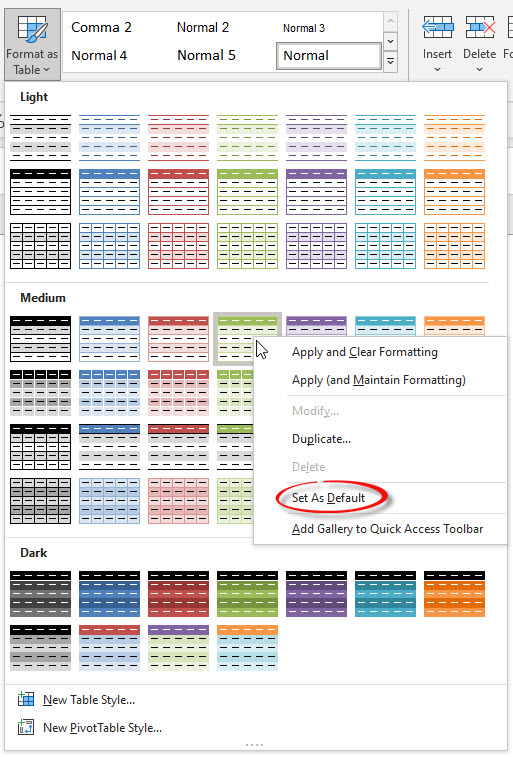
On the Home ribbon tab, click the Format as Table drop-down and right click the colour scheme you want to set as the default.
Select Set As Default from the menu.
Done!
Related Posts
Selecting a Column Range within a Merged Cell in Excel [video]
I am not a fan of the merged cell format. It causes more problems that it solves. One issue you will face is trying to select a single column range within a range that has a merged cell. Here is how you handle it.
This post is a video post as it easier to show the problem and the solution in a video.
Sparklines and Merged Cells in Excel
I am not a fan of Merged Cells but there may be a case to use them when creating a larger Sparkline chart.
Excel Month on Month Movement
A PivotTable solution
If you need to find the movement from the previous month a PivotTable can be your friend and do most of the work for you.
One Minute to Excel #28 – Eight More Charts in a Minute
Fast mouse work to the rescue
OK in the last video I cheated and used Sparkline charts to create 8 charts in a minute.
This time I set myself a real challenge to create 8 real charts in a minute.
Its close – check out the video and learn a few useful techniques.
One Minute to Excel #27 – Eight Charts in a Minute
Sparklines to the rescue
Let’s see if I can create 8 charts in a minute – one for each state and territory in Australia
I cheat a little bit and use Sparkline charts. If you haven’t seen Sparklines before check out the video.
Switching Between a Line and a Column Chart
Keeping charts simple is a good rule to live by. Two of the simplest charts are a column chart and a line chart. People have their preferences. Here is a short macro that lets you switch between the two chart types.
One Minute to Excel #26 – Fix AutoSum’s Weakness
Get the right range every time
AutoSum’s cryptonite is a blank cell – it stops AutoSum in its tracks every time.
Here’s how you can avoid AutoSum’s blind spot.
Excel Data Validation Blind Spot
Macro to fix it
One of the problems with Excel’s Data Validation is that it is possible to have an invalid entry in a data validation cell. This can be caused by Paste Special Values or linked drop downs that don’t update if an earlier drop down is changed. To easily identify invalid cells you can use a macro.
UNIQUE Function and Blank Cells in Excel
Zero in on a problem
The UNIQUE function has a bit of an issue with blank cells, formulas that return blank cells and zeroes.
Check out the winners of the Data Literacy awards.
Related Posts