It is our attitude at the beginning of a difficult undertaking which, more than anything else, will determine its successful outcome.
William James (1842 – 1910)
It is our attitude at the beginning of a difficult undertaking which, more than anything else, will determine its successful outcome.
William James (1842 – 1910)
When you create formulas that refer to other sheets Excel typically includes the name of the current sheet when you return to the current sheet and refer to a cell.
Using Excel’s built-in filtering can speed up your VBA code.
It is important if you are applying filters that you clear any existing filters before you apply a new filter. Otherwise the existing filters will usually affect a new filter you apply.
The line of code below will remove filters on Sheet1 (Sheet1 is the sheet code name that you see on the left side of the VBA screen – it may not be the sheet tab name).
If Sheet1.FilterMode Then Sheet1.ShowAllData
The .FilterMode property is True if a filter is in place on the sheet and False if not.
The .ShowAllData method will return an error if no filter is in place – hence the use of the If statement.
I wonder if we can get one of these on Power BI?
Saw this on the website below and liked it – I also like Avocados.
Avocado article on the ABC site

We must always change, renew, rejuvenate ourselves; otherwise we harden.
Johann von Goethe (1749 – 1832)
You may know the two keyboard shortcuts below for currency and percentage.

But what you may NOT know is a technique that has been around since the early versions of Excel.
The technique allows you to automatically apply these two formats after you type an entry.
It you type $1000 into a cell and press Enter. Excel will automatically apply the $ format to the cell. The $ sign will not display in the Formula Bar – see below.
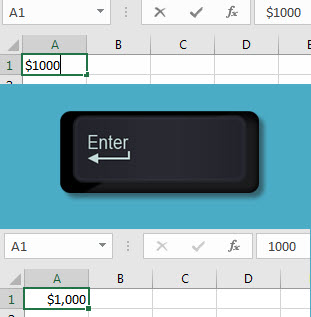
If you type 2.5% into a cell. Excel will automatically apply the standard % format to the cell. The % sign will display in the Formula Bar – see below.

As I mentioned these are really old skills that have been lost over the years since we no longer have Excel manuals – shows my age.
Here’s the problem, we have four separate tables with the same layout. They hold four different metrics: Actuals, Budget, Forecast and Last Year. A column called Type is used to hold the metric name. We need to populate the Type column.
Financial Modeling in Excel for Dummies (Wiley, 2017)
It takes less time to do a thing right than if does to explain why you did it wrong.
Henry Wadsworth Longfellow (1807 – 1882)
When you copy a sheet that contains range names you usually end up making a duplicate of those names at the Worksheet level. I have written a macro that removes all duplicated sheet-based range names in a file.
Of all the liars in the world, sometimes the worst are your own fears.
Rudyard Kipling (1865 – 1936)
Correction does much but encouragement does more.
Johann von Goethe (1749 – 1832)