Clearing the tab colour
I use colours on my sheet tabs to signify different things.
To clear a colour, you can use the following keyboard shortcut
Alt h o t n
Pressed in sequence, not held down.
Related Posts
I use colours on my sheet tabs to signify different things.
To clear a colour, you can use the following keyboard shortcut
Alt h o t n
Pressed in sequence, not held down.
Here is the problem – you have a list of values which includes sub-totals calculated using SUM functions. You only want add up the values and ignore the SUM function cells.
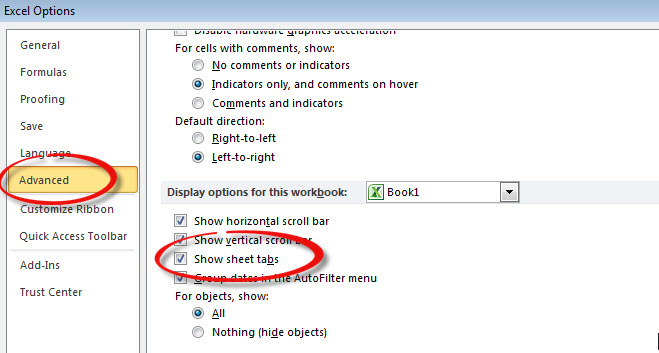
If you find the sheet tabs are missing at the bottom of the screen, you can fix the issue with the setting below.
To access this screen press, in sequence (not held down)
Alt t o a
and scroll down about half way.
You want a sequential number in a column. The challenge is, it must display as sequential even if rows are hidden or filtered. Is this possible?
The keyboard shortcut to clear all filters is pretty straight forward
Alt a c
Keys are pressed in sequence, not held down.

Some people regard discipline as a chore. For me, it is a kind of order that sets me free to fly.
Julie Andrews