There are times in Excel when you want to see as much of the Excel grid as possible. You may be reviewing or presenting a dashboard or looking at a large PivotTable. Excel has a Full Screen mode that shows just the grid and the sheet tabs.
This feature has been hidden away in newer versions. Below is a screen shot of Full Screen mode.

As you can see it maximises the screen with the grid – you lose the Formula Bar, but you can still edit in a cell.
The shortcut to switch to Full Screen mode is
Alt v u

This is an Excel 2003 shortcut that still works in the latest versions.
To go back to the normal view press the Esc key.
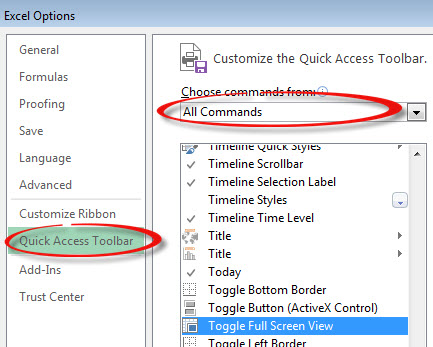
There is a Full Screen icon you can add to the Quick Access Toolbar.
It is named Toggle Full Screen View and it is in the All Commands section – see below.
Thanks mate, really helpful
Happy to help.