Is this you? You open the May file and make the changes for June and save it and then remember you hadn’t renamed the file as June. Well, I’ve done that too.
Monthly Archives: June 2015
Determine that a thing can and shall be done, and then we shall find the way.
Abraham Lincoln (1809-1865)
Excel – How To Create a MINIF and a MAXIF
Without an array
Excel doesn’t have a MINIF or a MAXIF function and many advanced users create an array formula to provide that functionality. If you have Excel 2010 or later there is a non-array solution.
The deepest principle of human nature is the craving to be appreciated.
William James (1842-1910) American Philosopher and Psychologist
Enabling PowerPivot
XL2013 and XL2010
In my latest free webinar I provided a brief demonstration of PowerPivot in Excel 2013. I forgot to show you how to enable it. Luckily its easy.
It is right to be content with what we have, never with what we are.
James Mackintosh (1765-1832)
“Neale’s rule of creation #1 “To do it right, everything always takes longer to create than you think it will. Plan accordingly.””
@ExcelYourself
4:18 PM - 12 Jun 2015
4:18 PM - 12 Jun 2015
It takes less time to do a thing right, than it does to explain why you did it wrong.
Henry Wadsworth Longfellow (1807-1882)
Data Validation to Ensure a Weekend Date
If you want to ensure the user enters a date that is a Saturday or a Sunday, you can use a Custom Data Validation.
This example is for cell A1.
To open the Data Validation dialog use Alt a v v (pressed in sequence, not held down).
Click the first drop down and select Custom. This allows you to enter a formula to determine the data validation.
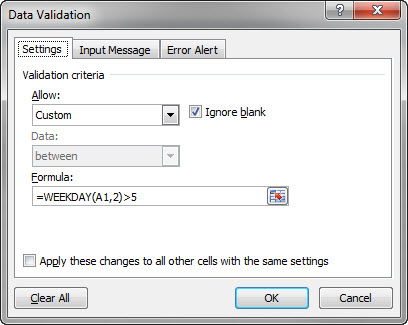
The formula used is
=WEEKDAY(A1,2)>5
The WEEKDAY function returns a number from 1 to 7 for the days of the week. The ,2 in the function means 1 = Monday, 6 = Saturday and 7 = Sunday.
Click OK to apply.
If you wanted to ensure weekday dates you could use the formula
=WEEKDAY(A1,2)<=5
Pasting Data to the Bottom of a Formatted Table
One trap to avoid
Formatted tables are a great feature in Excel. They were expanded and renamed in Excel 2007 (formerly called Lists) and their use offers many advantages.
This Australian woman is an inspiration.
She talks very eloquently about being a Muslim and a woman and the biases faced everyday.
To be conscious that you are ignorant is a great step to knowledge.
Benjamin Disraeli (1804–1881)
The ability to concentrate and to use time well is everything.
Lee Iococca
Running an Excel Macro from a Graphic
Its easy to set up
These days running a macro off a control button seems to be old school and many people have started running macros off graphics.