The most difficult thing is the decision to act, the rest is merely tenacity.
Amelia Earhart
The most difficult thing is the decision to act, the rest is merely tenacity.
Amelia Earhart
Following on from my last two VBA posts here is how you can identify the cell addresses of the first and last cells in a range.
Strive not to be a success, but rather to be of value.
Albert Einstein
When I ran some face to face training sessions recently I was reminded how much people LOVE shortcuts. I did a keyboard shortcut webinar session in October 2018.
In November 2018 I shared lots of mouse shortcuts. Download the materials using the button below and watch the video.
CPD note – if you are claiming CPD for watching this recording you need to keep your own records. People who attend the live sessions receive an annual listing of attendances.
Some of the topics and techniques you will learn include:
This session will demonstrate lots of techniques using the mouse and also using the mouse with the keyboard.
Even if you prefer using the keyboard you might learn a few useful new techniques.
In my last blog post I found the last used row and column numbers on the active sheet. This post lets us find the row and column extremities of a specific range.
Life is 10% what happens to me and 90% of how I react to it.
Charles Swindoll
Apparently this is not widely known, but you should always bold the headings in your tables.
Then when you use Format as Table (Ctrl + t) on the Home ribbon tab the header row will be correctly identified.
This also applies to the Ctrl + Shift + L shortcut to insert the filter drop downs.
It also applies to the ranges used for charts.
In general ALWAYS BOLD your headings – it is something Excel looks for.
Ctrl + b is the bold shortcut.
When writing VBA code it is common to need to know the last used row and/or the last used column. These values provide the edges of the sheet contents.
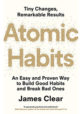
Atomic Habits (Random House, 2018)
A new book that covers how you can make small incremental changes over time that lead to large results.
Atomic means small, as in atoms.
I have followed James’s Blog (link below) for a number of years and this book covers topics from the blog plus new material.
His back story is interesting and inspiring.
It is a practical book and he provides ideas to increase your good habits and reduce your bad habits – useful strategies to do both are included.
Habits are automatic and many times unconscious, so the more automated and intentional you make your habits the more time you have for other important things.
You may need to read it a couple of times to get the most out of all his suggestions.
Highly recommend.
Here is a technique that allows you to turn off and turn on the conditional format without actually removing the conditional format. You may want to do this to print a sheet without the conditional formats being applied.