When you transform data using Power Query it will often automatically promote the headers (use first rows headers) and guess the data types for each column. You can stop it doing this.
Monthly Archives: December 2020

Your Music and People (Hit Media, 2020)
I first heard about Derek Sivers on Tim Ferris’s podcast and now have three of his books.
His back story is amazing and covered in a previous book.
This book is written about music and musicians, but it really applies to any creative endeavor.
Good ideas to help you get your music (or creative work) out there.
Short read – recommend.
Available from his website – link below.

Hell Yeah or No (Hit Media, 2020)
I first heard about Derek Sivers on Tim Ferris’s podcast and now have three of his books.
His back story is amazing and covered in a previous book.
This book is about identifying and doing what’s important.
Lots of short ideas to help kick start your important work.
It is a short read and I think only available from his website – link below.
Power Query and large data sets
Saving time
When working with some large data sets in Power Query it may be useful to default your Close and Load option to Connection Only rather than a Table. That way if you do strike an issue it won’t take ages to load to data.
Entering today’s date in Excel
It works in lots of places
You can use a keyboard shortcut to enter today’s date in a cell, but you can also use it in lots of other places in Excel.
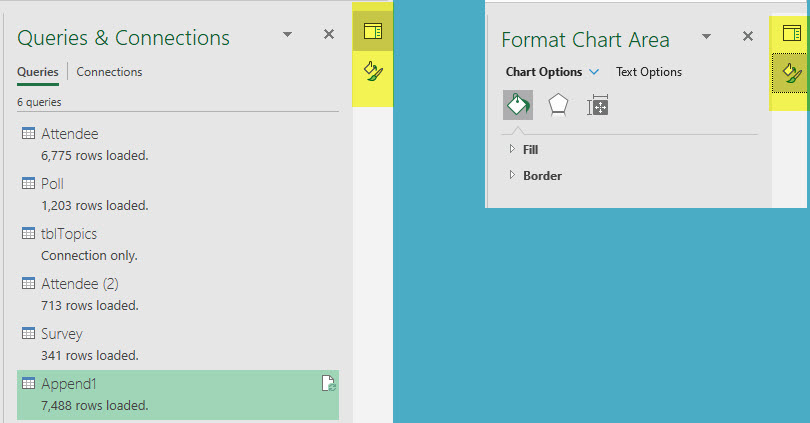
New Task Pane Icons
Seems new icons have been added in the right of screen to allow you to switch easily between Task Panes in a recent upgrade.
This is in the subscription version of Excel.
Power Query shortcut for Adults
The shortcut to display the Queries & Connections Task Pane is easy to remember. It is Adults Only!
To display or hide the Queries & Connections Task Pane you use. These keys are pressed in sequence, not held down.

So only adults allowed in Power Query.
Related Posts
The Practice (Penguin, 2020)
Another great book by Seth.
It is written in bullet point form and has lots of pearls of wisdom to help you get your work out there into the world.
Seth looks at things a bit differently and that can help you focus on what you need to do and get it done.
Summing Text Numbers in Excel Updated
Dynamic arrays to the rescue
I wrote a blog post a few years back showing how to add up numbers formatted as text. If you have the subscription version of Excel you have another solution.
Get the Sign Right in Excel
Get the ABS you deserve
I was recently working with some data that had some issues with the sign on the quantities. The quantities should have had the same sign as the associated dollar amount, but they didn’t. Here is how I fixed it.