In skating over thin ice, our safety is in our speed.
Ralph Waldo Emerson
In skating over thin ice, our safety is in our speed.
Ralph Waldo Emerson
When you protect a sheet with a password, you must make a note of the password, otherwise you create problems for yourself.
Did you know you don’t have to supply a password?
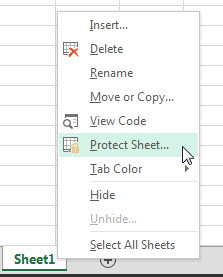
To apply sheet protection, right click the sheet tab and choose Protect Sheet.
When the Protect Sheet dialog displays just press Enter or click OK.
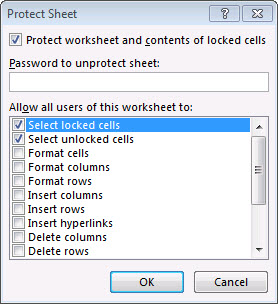
This protects the sheet with no password.
This stops accidental changes and you can easily unprotect the sheet to make changes.
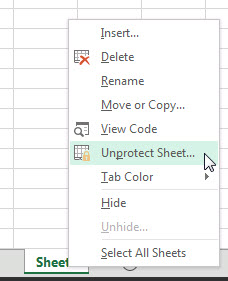
You can right click the sheet tab to unprotect as well.
I had a question on another post on how to convert Nov 21, 2014 into a date Excel recognises. The solution involves six functions working together.
To learn one must be humble. But life is the great teacher.
James Joyce
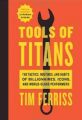
Tools of Titans (2016)
It has lots of great ideas, concepts, tricks and tips. Highly recommend.
Tim is famous for the 4 hour work week book, but more recently his podcasts have become legendary.
The book is based on the people Tim has interviewed and had on the Podcast (not all the podcasts are interviews). I am a big fan of the podcast and the book delivers.
Great to have so much information in one book.
In the introduction Tim says to skip stuff that doesn’t interest you. I have skipped over a lot of the “supplement” chapters as it isn’t my thing.
But there are still lot of gems in this book no matter what your stage in life.
The kindle version has lots of internal links within the book.
Definitely worth your money, time and effort.
If you need to convert a number into a text number within a formula there are a couple of ways to achieve this, but one way is a lot easier.
I have been listening to Tim Ferriss’s podcasts for a few years now.
Its brilliant!
As well as having many famous people on, he also has people who aren’t so famous but are amazing nonetheless.
Many episodes go over 2 hours.
Highly recommend – great for car travel.
There is occasional swearing, not much, but if you don’t like that, you have been warned.
The content is well worth ignoring the occasional swear word.
A wise man can learn more from a foolish question than a fool can learn from a wise answer.
Bruce Lee
Let’s say you have a table of codes and every month there are a few you want to check out. You could use a VLOOKUP to extract all the details for each code, but let’s say you want to view the codes in the table.
The difference in winning and losing is most often not quitting.
Walt Disney
Excel 2013 added the Data Model to Excel.
The Relationships option (Data ribbon) is part of that model. It allows you to create relationships between tables so that you can use a PivotTable to report on multiple tables.
You have to have used the formatted table option to use Relationships.
See my December 2016 INTHEBLACK article for an example.
The keyboard shortcut to create or edit, a Relationship is easy to remember – it is
Alt a a
Pressed in sequence, not held down.

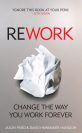
Rework
A short book with short chapters meant to get you thinking differently about work.
Much of what the book covers goes against the “common” advice out there.
It gets you thinking (sometimes differently) and that’s one thing a good book is all about.
David Heinemeir Hansson has recently been featured on two Tim Ferris podcasts – two excellent episodes.
Some informative charts showing how the world has change in the last 200 years.
Worth a look – some good trends there.