In a protected worksheet users can still click on checkbox and option button controls. A warning message will pop up if the control’s linked cells are locked. There is a technique you can use to stop users clicking on these controls. This involves a macro that you can run just before you protect the sheet.
Monthly Archives: August 2023
Drop Down Selection update
Woohoo!
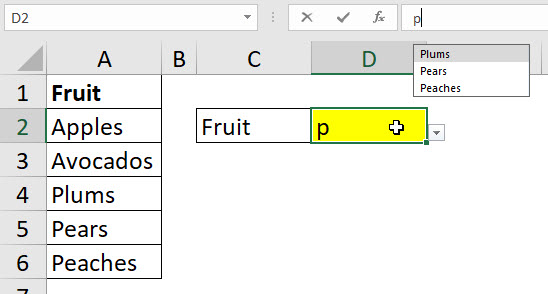
It has taken a decade or so but Excel finally has an in-cell drop down that you can type a letter and reduce the entries listed – see screen shot below.
Excel and Ordinals
A recent update to Excel included ordinals as an option when you drag with the fill handle. A few months back I made a post about a Custom function for ordinals in dates. Dates are a bit easier because they max out at 31. I thought I would extend the function so that it handled all numbers.
Fixing the UNIQUE Function
The UNIQUE function in Excel has a problem when it comes to handling blank cells. Blank cells are treated as zero and if you have a blank cell and a zero in a range then UNIQUE will return two zeros. Also, if a cell has a function that returns a blank cell, then that is treated differently than a blank cell. Let’s create a custom function to fix UNIQUE’s blank cell blind spot.
Convert Day Text into Day Number in Excel
Excel uses a number from 1 to 7 to refer to the days of the week. The WEEKDAY function returns the number based on a date. Excel doesn’t a have a function to return the day number based on a text day like Monday. Time for a custom function.
Custom Function to Count Specific Characters in Excel
I have previously covered a formula that counts specific characters. Since it used multiple functions, I thought I would simplify it by creating a custom function.